The Practical Guide to Sourcing and Installing a Replacement PCB Board
How to Choose the Right PCB Board Replacement
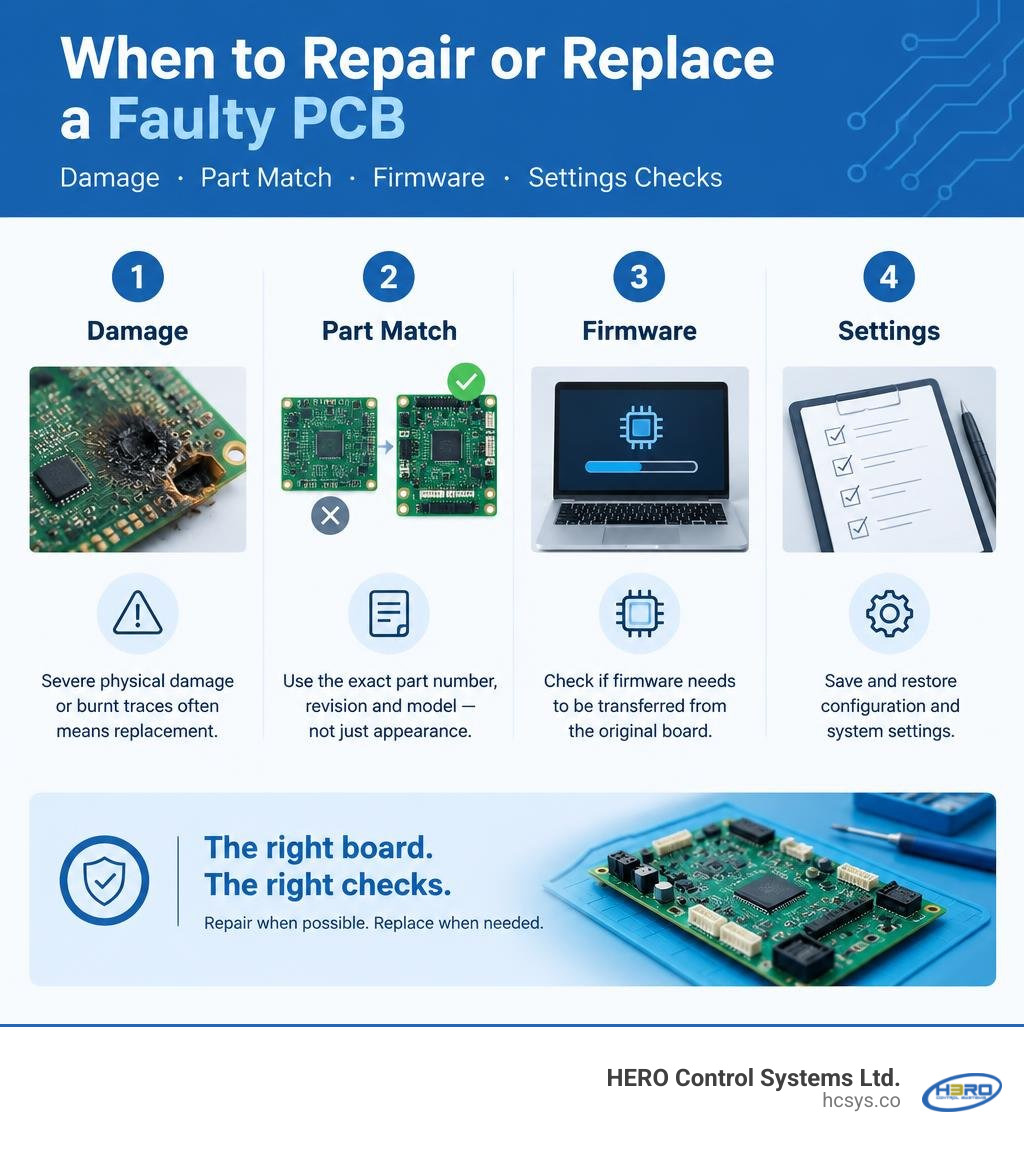
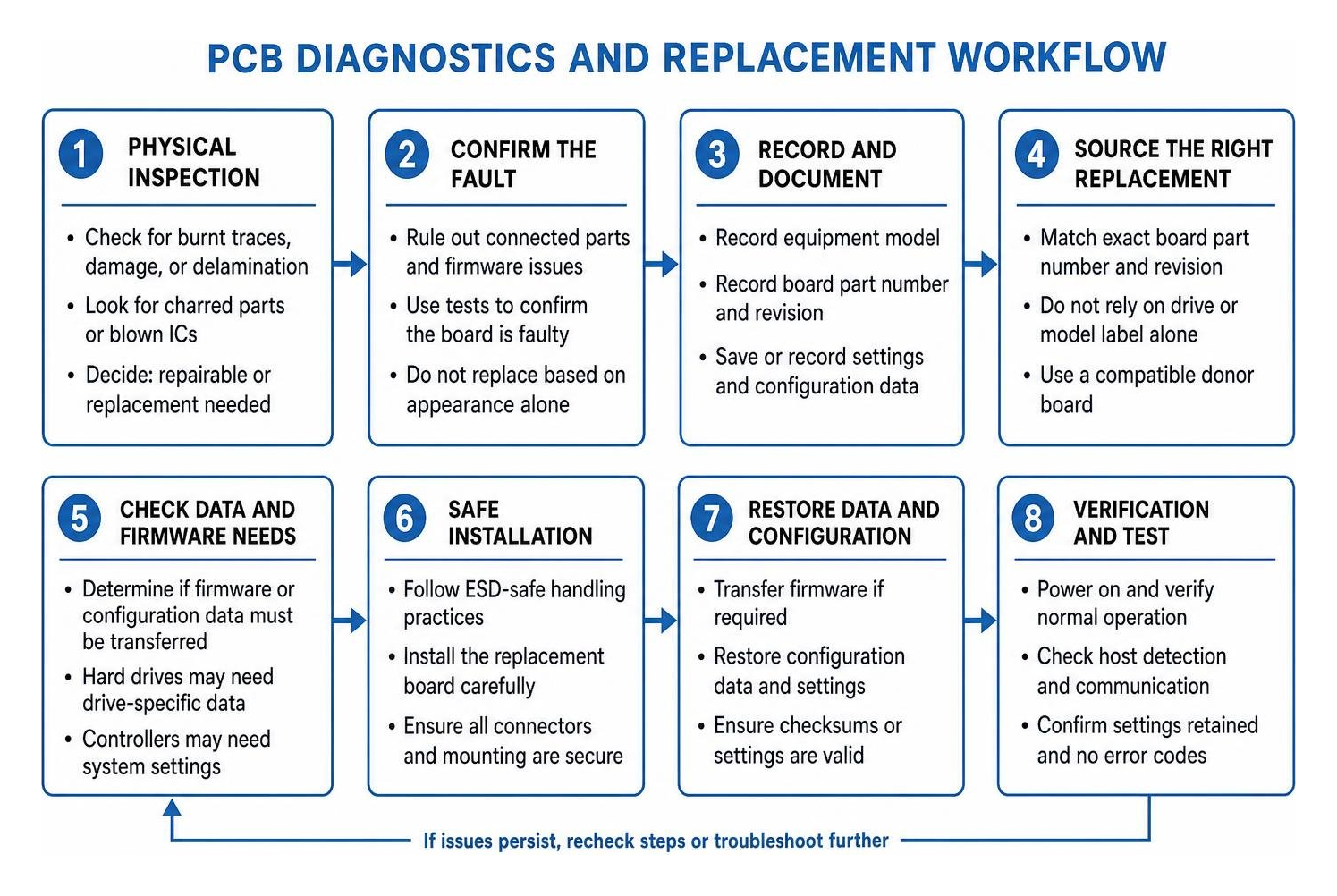
For a PCB board replacement, first confirm the board is faulty, not just a connected part or its firmware. Record the equipment model, the board's part number and revision, and any saved settings. Then source a compatible board and check whether it needs firmware or configuration data transferred from the original. Do not install a board based on appearance alone.
A burned trace or badly damaged board may call for replacement; a failed component may be repairable. In a hard drive or industrial controller, the correct board can still fail to work if its drive-specific data or system settings are missing.
I'm Eng. Cephas Kalembo, founder and CTO of HERO Control Systems Ltd. in Lusaka. My work in PCB design, firmware, and industrial electronics repair shapes this guide to pcb board replacement, from finding the right part to installing it safely.
Diagnosing Circuit Board Failure: When Is a PCB Board Replacement Necessary?
Every technician eventually faces the fundamental question: should you rework a broken board or swap it out entirely? While minor component failures such as blown smoothing capacitors or cracked solder joints make great candidates for component-level repair, extensive physical destruction leaves replacement as the only viable path forward.
Look for key indicators of unrecoverable PCB failure:
- Severe delamination or charred substrate: When an overcurrent event chars the fiberglass (FR-4) core, it creates conductive carbon pathways inside the board layers that cannot be reliably cleaned out.
- Internal trace destruction: Multi-layer boards (often 4 to 12 layers deep) can suffer internal trace vaporisation during violent electrical surges.
- Widespread IC destruction: If a catastrophic voltage surge punches through power management ICs, flash memory, and the main processor simultaneously, repairing each trace and component becomes cost-prohibitive.
However, many apparent hardware failures are actually software problems. A device might fail to boot, show communication errors, or throw drive faults when the underlying silicon is completely healthy. Understanding troubleshooting faulty electronics and firmware ensures you do not waste time tracking down hardware for an issue that stems from corrupted non-volatile memory or logic tables.
| Symptom / Behavior | Likely Hardware PCB Failure | Likely Firmware or Logical Corruption |
|---|---|---|
| Power State | Completely dead; zero current draw or dead short pulling rail low | Powers on normally; stays stuck in endless boot loop or idle state |
| Physical Appearance | Blistered IC packages, scorched FR-4, pungent burnt smell | Board looks pristine with clean rails and normal thermal camera profile |
| Bus / Host Detection | Host interface controller shows no device connected on the bus | Device identified with generic factory name, wrong serial, or 0-byte size |
| Acoustic / Mechanical | Actuators do not move; spindle or cooling fans completely inactive | Motors spin up continuously, but drive heads click repeatedly before halting |
| Error Reporting | Immediate hardware overcurrent or open-loop sensor fault | Checksum mismatch, unreadable system tracks, or invalid configuration register |
Sourcing the Right Donor: Critical Identifiers in HDD PCB Board Replacement

In data storage devices, sourcing an exact donor board is significantly more demanding than simply matching the drive model on the front label. Hard drive manufacturers iterate board revisions rapidly across production batches, even within the same product family. If you try to swap a board based only on the external drive model (such as a 2TB Western Digital Blue or a Seagate Barracuda), the heads will fail to initialise.
To find an electrically and logically compatible donor, match specific identifiers across major drive manufacturers:
- Western Digital: Locate the board number etched directly into the copper on the back of the PCB (e.g.,
2060-701537-003or2060-800041-000). The donor board must match this exact identifier. - Seagate: Search for the etched board number on the PCB layer (e.g.,
100687658or100717520). Matching the board number ensures motor controller and preamp drive compatibility. - Toshiba: Match the specific board identifier etched on the board surface, such as
G002825AorG003250B. - Samsung: Identify the silk-screened or etched PCB model, commonly formatted like
BF41-00282A. - Hitachi (HGST): For 3.5-inch drives, match the Main Controller IC number directly (e.g.,
13G0196). For 2.5-inch laptop drives, match the white paper barcode sticker number (e.g.,0J24163). - Fujitsu: Cross-reference the distinct board part number, typically following a pattern like
CA26344-B33104BA. - Maxtor: Locate the Main Controller IC identifier printed across the largest chip package (such as
040111300).
BIOS and Firmware Chip Transfer in a PCB Board Replacement
Locating the identical board number is only half the battle. On modern hard drives, you cannot simply screw on a replacement donor board and power the drive up. Every drive contains unique, factory-calibrated adaptive data stored inside an on-board flash memory chip (often called the ROM or BIOS chip).
This non-volatile memory stores head alignment offsets, track pitch variations, defect management tables, and preamp gain values calculated during factory testing. Without these unique adaptive parameters, the replacement PCB's controller cannot read the system area tracks on the magnetic platters.

- Locate the 8-pin ROM chip: Search the faulty board for an 8-pin serial flash IC, commonly marked with designations such as
25P05VP,25P10VP,25F512,SST25VF512, orAT25DF041A. - Protect surrounding components: Apply polyimide (Kapton) tape over adjacent surface-mount resistors, passives, and plastic motor power connectors to shield them from excessive heat.
- Desolder the chip: Apply tacky flux to all eight pins. Using a hot-air rework station set between 330°C and 350°C, direct gentle airflow around the chip perimeter until the solder liquefies, then lift the IC with precision tweezers.
- Transfer to the donor PCB: Remove the donor board's existing ROM chip, clean the pads using desoldering braid, apply fresh leaded or lead-free solder paste, and solder the original ROM chip into position. Pay strict attention to Pin 1 orientation (indicated by a dot, notch, or silk-screen chamfer).
- Integrated ROM situations: On some drives—particularly newer Western Digital and Toshiba micro-drives—the adaptive ROM code is embedded directly inside the silicon of the main controller IC (system-on-chip). In these situations, transplanting the ROM requires desoldering and re-balling the entire Ball Grid Array (BGA) processor chip onto the donor board.
Sourcing OEM and Legacy Boards for Industrial Applications
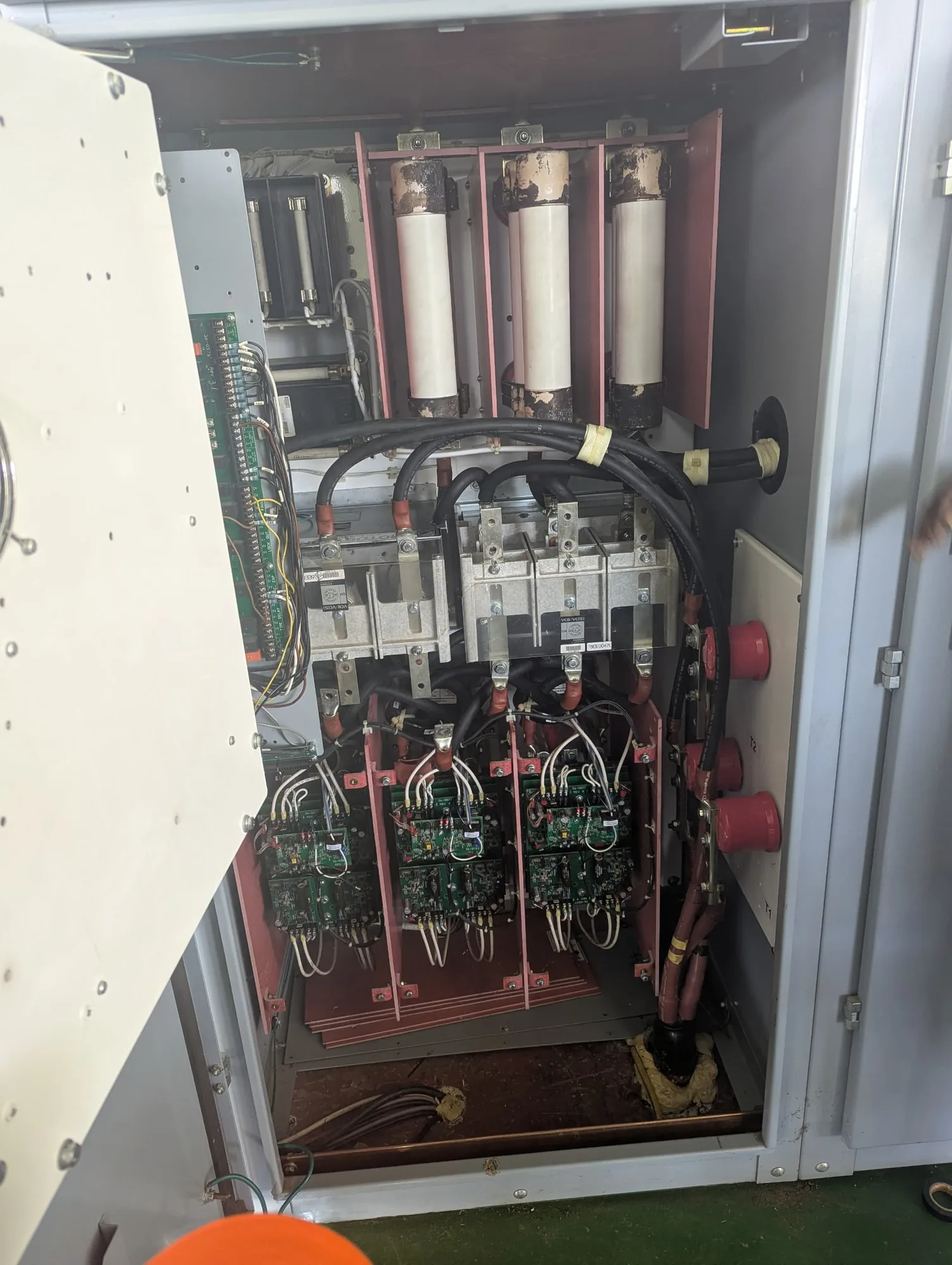
Industrial automation presents unique challenges during circuit board sourcing. In manufacturing plants, processing facilities, and utility installations, replacing an entire machine because of a single fried sub-assembly is financially impractical. However, sourcing individual control boards requires navigating both modern OEM distribution networks and legacy New Old Stock (NOS) inventories.
High-reliability industrial circuit boards command significant investments due to rigorous quality certifications, ruggedised components, and conformal coatings. For example, genuine OEM replacement boards such as the ABB PSPCB-CB-2 softstarter control board (compatible with the PSTX210 through PSTX370 series) list at $1,490.04, while specialized elevator controller modules like the KONE KM700000G01 reach $2,750.00.
In renewable power systems, replacing individual sub-boards restores key communication interfaces without requiring the replacement of complete electrical enclosures. A prime example is swapping out a damaged communication motherboard with a Replacement IQ Gateway PCB for IQ Combiner 4 | Enphase, which restores monitoring capabilities across multiple combiner generations (including the 3/3C, 3-ES, and 4/4C series).
When legacy automation lines suffer electrical damage and OEM production has ended, technicians must turn to tested NOS boards or specialized engineering support. Our work in industrial automation equipment repair frequently involves reverse-engineering unprocurable control modules, replacing damaged traces, and sourcing verified NOS inventory to keep critical processing infrastructure operational.
VFD and Drive System Board Swaps
Variable Frequency Drives (VFDs) and high-power motor controllers are constantly exposed to electrical stress, voltage spikes, and thermal cycling. Within a large industrial inverter, the electronic architecture is split between two primary board types: the high-voltage power stage (housing the rectifier diodes, DC bus capacitors, and IGBT switching modules) and the low-voltage control and gate driver board.
When repairing automated drive systems, isolating board-level faults is crucial:
- Gate Driver Board Failure: If an IGBT module fails short-circuit, high DC-link voltage can flash back through the gate emitter terminals, destroying the optocouplers, buffer transistors, and gate resistors on the driver board. In this scenario, replacing the IGBT without replacing or rebuilding the driver board will instantly destroy the new power module.
- Microprocessor Control Board Failure: In dusty or humid operating environments, conductive contaminants bridge fine-pitch pins on the main Digital Signal Processor (DSP) board, leading to lost encoder feedback, communication dropouts, or unresolvable internal drive trips.
When diagnosing complex drive faults, explore our guides on diagnosing and restoring variable frequency drives as well as dedicated drive servicing for industrial motor control platforms.
Step-by-Step Guide to Safely Replacing and Soldering a Circuit Board
Replacing a printed circuit board requires disciplined bench procedures to avoid destroying replacement hardware through electrostatic discharge (ESD) or thermal stress. Over 10,000 PCB board listings and prototype accessories exist on global marketplaces, showing how widespread soldering and board swaps have become. However, executing a reliable, factory-grade board swap demands precision tools and structured procedures.
Phase 1: Pre-Disassembly and Data Capture
- Isolate all power: Lock out and tag out (LOTO) industrial panels, discharge high-voltage electrolytic capacitor banks with a suitable resistive load, and verify zero voltage across all test points using a calibrated multimeter.
- Document connectivity: Take high-resolution photographs of every ribbon cable, terminal block, jumper position, and wiring harness. Mark multi-conductor looms with heat-shrink labels.
- Backup configuration: If the board's digital core is still communicating via serial, Ethernet, or JTAG interfaces, download the parameter set, PLC registers, and calibration tables to an external PC.
Phase 2: ESD Safe Removal
- Ground your workstation: Wear a grounded ESD wrist strap connected to an verified earth ground. Work exclusively on dissipative rubber bench mats.
- Extract with care: Unfasten standoffs using correct torque bits. Never pry against the edges of a PCB with metallic screwdrivers, as this fractures fine traces running through outer signal layers.
Phase 3: Rework and Donor Component Soldering
If your replacement PCB requires transferring configuration chips, connectors, or microcontrollers:
- Thermal management: Pre-heat the entire PCB substrate to 100°C–120°C using an under-board infrared preheater. This minimises local thermal shock when applying hot air to component pins.
- Component desoldering: Apply high-grade tacky rosin flux to the component leads. Use focused hot air set to the minimum temperature needed for reflow, avoiding continuous heat on delicate silicon dies for longer than 10 seconds.
- Pad preparation: Clean the target board footprint using copper desoldering braid soaked in flux. Remove oxidized intermetallic layers until the copper pads are flat and mirror-bright.
- Resoldering and inspection: Align the donor IC, apply fine-gauge solder wire or solder paste, and reflow each pin. Inspect every solder joint under stereomicroscopic magnification (10x to 40x) to confirm proper concave wetting fillets and rule out solder bridges or voiding.
When standard off-the-shelf boards are obsolete or discontinued, we also engineer drop-in hardware replacements through custom circuit fabrication and board design.
Frequently Asked Questions About PCB Board Swaps
How do I know if my hard drive failure is the PCB or bad sectors?
To determine whether an HDD failure originates on the circuit board or in the mechanical assembly, check power, acoustic, and bus behavior:
- Dead board indicators: If the drive does not spin up at all, emits no sound, draws zero current, smells scorched, or shows visible burn marks near the transient-voltage-suppression (TVS) diodes, the PCB is damaged.
- Mechanical and media indicators: If the drive spins up smoothly but emits continuous clicking sounds (often called the click of death), spins down after a few seconds, or is recognized by the operating system as an unreadable 0-byte disk, the PCB is usually functioning. These symptoms point to failed read/write heads, seized spindle bearings, or heavily degraded magnetic platters containing bad sectors. A PCB swap will not resolve head or platter degradation.
Can I replace an industrial PCB without reprogramming the parameters?
In most industrial controllers, programmable logic controllers (PLCs), and variable speed drives, you cannot perform a plug-and-play board swap without addressing memory configuration:
- Hardware vs. Parameter memory: A brand-new replacement board arrives with blank non-volatile memory (EEPROM/Flash) or generic factory-default firmware.
- Parameter restoration: If you install the board directly, the machine will likely fault out due to missing motor constants, bus addresses, safety interlocks, and I/O assignments.
- Procedure: You must either upload the saved configuration backup from your engineering workstation, transplant the physical EEPROM memory chip containing the parameter maps, or manually enter all machine parameters via the human-machine interface (HMI).
What tools are essential for transferring an 8-pin BIOS chip?
Safely transplanting an 8-pin surface-mount flash memory IC requires a dedicated SMD rework kit:
- Temperature-controlled hot-air rework station: To deliver uniform, regulated thermal energy across all eight pins simultaneously without scorching the chip body.
- Precision ESD-safe tweezers: Curved or vacuum tweezers designed to lift the chip vertically off the molten solder pads without dislodging neighboring passive components.
- High-grade no-clean tacky flux: To prevent solder oxidation, improve heat transfer, and eliminate bridging across adjacent pins.
- Polyimide (Kapton) tape: To shield sensitive surrounding components, plastic headers, and connectors from stray hot air.
- Desoldering braid (wick) and fine solder wire: Leaded (Sn63/Pb37) or high-quality SAC305 lead-free solder wire to prepare flat landing pads and secure reliable joint fillets.
- Magnification / Optical microscope: An inspection stereomicroscope or high-resolution digital microscope to verify pin alignment and check for microscopic bridging prior to powering the device.
Conclusion
A successful pcb board replacement bridges the gap between hardware identification, thermal precision, and firmware management. Whether you are swapping a hard drive controller board to recover critical business records or replacing a multi-thousand-dollar automation module in a busy manufacturing plant, methodical execution makes all the difference. Always verify hardware revision codes, transfer essential non-volatile calibration parameters, and maintain rigorous ESD control throughout the process.
At HERO Control Systems Ltd., we combine deep electronics engineering, advanced component-level diagnostic laboratories, and embedded firmware expertise to deliver end-to-end hardware solutions. From precision PCB rework and embedded IoT development to comprehensive automation recovery, explore our comprehensive industrial repair and engineering solutions to keep your mission-critical electronics running reliably.