A Step-by-Step Tutorial to Fix PCB Pad Lift and Restore Solder
How to Fix a Lifted or Missing PCB Pad
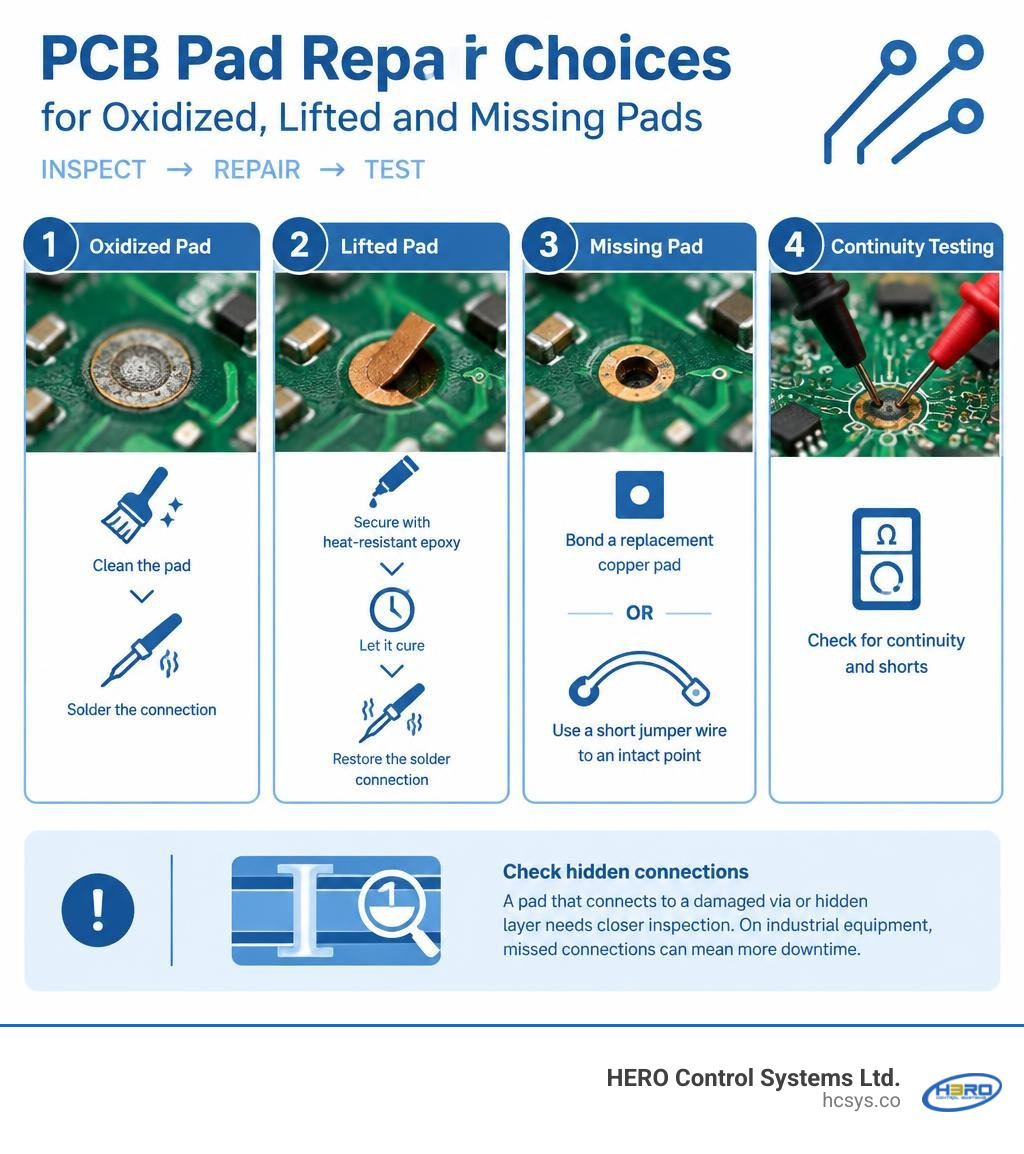
To fix a PCB pad, disconnect power and inspect the copper trace. Clean an oxidized pad before soldering. If the pad has lifted but is intact, secure it with heat-resistant epoxy, let it cure, then restore the solder connection. If the pad is missing, bond a replacement copper pad or connect the component to an intact point on the same circuit with a short jumper wire. Test for continuity and shorts before powering the board.
A pad that connects to a damaged via or hidden layer needs closer inspection. On industrial equipment, a repair that looks sound but misses that connection can mean more downtime.
I'm Eng. Cephas Kalembo, founder and CTO of HERO Control Systems Ltd. My work in PCB design and industrial electronics repair has given me the experience to help teams fix pcb pad damage with care.
Diagnosing Pad Damage and Essential Rework Tools
When working on complex circuit boards, pad damage can halt progress instantly. Whether caused by excessive thermal cycling, improper desoldering braid technique, or physical tugging on a connector, delaminated copper ruins trace continuity. Before attempting any repair, we must categorize the failure mode and gather the correct precision tools. When handling high-stakes field equipment, relying on structured industrial repair practices ensures that we do not trade a loose pad for permanent board failure.
Visual Inspection and Damage Classification
Proper diagnosis under magnification prevents unneeded board scraping. We categorize pad damage into four distinct states:
- Oxidized or Contaminated Pads: The copper remains fully bonded to the fiberglass substrate (FR-4) but has developed a dull, dark, or blackened oxide layer that prevents solder wetting.
- Partially Lifted Pads: The copper land has detached from the underlying laminate due to adhesive failure, but the electrical connection to the feeding circuit trace remains intact.
- Completely Missing Pads: The copper land has torn completely off the board surface, leaving behind bare FR-4 epoxy glass, often snapping the trace right at the perimeter.
- Pad and Via Ruptures: The pad has ripped away while pulling out an internal plated barrel (via), breaking connections to internal signal or ground planes within a multilayer stackup.

Required Soldering Equipment and Materials
Successful micro-rework demands specialized tools that provide absolute thermal and mechanical control:
- Temperature-Controlled Soldering Station: An iron capable of maintaining a stable temperature between 300°C and 350°C with micro-chisel or fine-conical tips.
- Microscope or High-Power Loupe: Essential for inspecting 0.5 mm pitch pads, micro-cracks, and fine traces.
- Adhesives and Resins: High-temperature, two-part epoxy (rated for electronic rework) and UV-curable solder mask. The engineering community frequently shares insights in discussions on lifted pad adhesives regarding how standard glues fail under thermal stress.
- Micro-Wiring: 30 AWG to 40 AWG enameled copper wire (magnet wire) for trace bridging.
- Surface Preparation Tools: A fiberglass abrasive scratch pen, precision scalpel (No. 11 blade), lint-free wipes, and 99% pure isopropyl alcohol (IPA).
- Copper Foil and Replacement Pads: Pre-formed copper replacement eyelets or adhesive-backed copper foil sheets.
Core Techniques to Fix PCB Pad Delamination and Missing Traces
Restoring a circuit board requires matching the repair strategy to the physical demands placed on the joint. Below is an engineering comparison of the four primary repair methods:
| Repair Method | Best Use Case | Mechanical Strength | Thermal Resistance | Relative Skill Level |
|---|---|---|---|---|
| Two-Part Epoxy | Partially lifted intact pads | High | Medium to High (up to 200°C) | Intermediate |
| Copper Foil Patch | Completely missing SMT pads | Very High | High (withstands soldering) | Advanced |
| Jumper Wire Bypass | Torn traces, ripped pads | High (with UV mask) | High | Intermediate |
| Conductive Silver Epoxy | Heat-sensitive components | Low | Low (non-solderable) | Beginner |
Method 1: Use Two-Part Epoxy to Fix PCB Pad Lift
When a pad has delaminated from the substrate but remains unbroken from its electrical trace, re-bonding it with high-temperature epoxy provides a clean repair.
- Clean the Void: Gently lift the pad with fine tweezers just enough to clean beneath it using a micro-applicator dampened with 99% isopropyl alcohol. Remove any loose substrate flakes.
- Apply Adhesive: Mix a small batch of two-part optical or electronic-grade epoxy. Using the tip of a fine needle or 30 AWG wire, place a microscopic droplet of epoxy beneath the lifted copper pad.
- Position and Clamp: Press the pad flat against the board surface. Place a strip of high-temperature polyimide (Kapton) tape over the pad to hold it in exact alignment without adhering to the epoxy.
- Cure the Epoxy: Standard epoxy systems require a curing time of typically 24 hours at room temperature, which can be safely accelerated with mild heat (around 60°C for approximately 1 hour). Established SMT pad rework guidelines emphasize that allowing full chemical polymerization prevents the pad from lifting again when heat is reintroduced.
- Remove Tape and Solder: Peel back the polyimide tape. Solder the component lead while strictly limiting iron contact time to 2–3 seconds.
Method 2: Solder a Copper Foil Patch to Fix PCB Pad Loss
When the pad is gone, we rebuild the conductive land using copper replacement foil:
- Surface Milling: Scrape away charred laminate and clear remaining solder mask from the connecting trace to expose bright, bare copper.
- Foil Fabrication: Using precision micro-shears or a scalpel, cut a new pad from copper foil. Leave a small connecting tab extension.
- Ensure Overlap Dimensions: Per engineering standards, the overlap solder connection should be a minimum of 2 times the circuit width to ensure full electrical conductivity and mechanical stability. Furthermore, maintain the overlap solder joint connection at a minimum of 3.00 mm (0.125 inches) from the related termination whenever possible to prevent simultaneous reflow during later assembly.
- Bonding the New Land: Apply a thin layer of two-part rework epoxy to the board surface where the pad will sit. Lay the copper patch into place, aligning the tab over the scraped trace. Secure it firmly with polyimide tape and cure.
- Lap Solder Joint: Once cured, clean the exposed copper tab and trace, apply liquid rosin flux, and perform a quick lap solder joint using a fine-point iron.
Method 3: Run a Jumper Wire or Solder Bridge for Torn Traces
If cosmetic perfection is less critical than rapid electrical restoration, or if the trace broke off entirely back to a via or component pin, run an insulated micro-jumper.
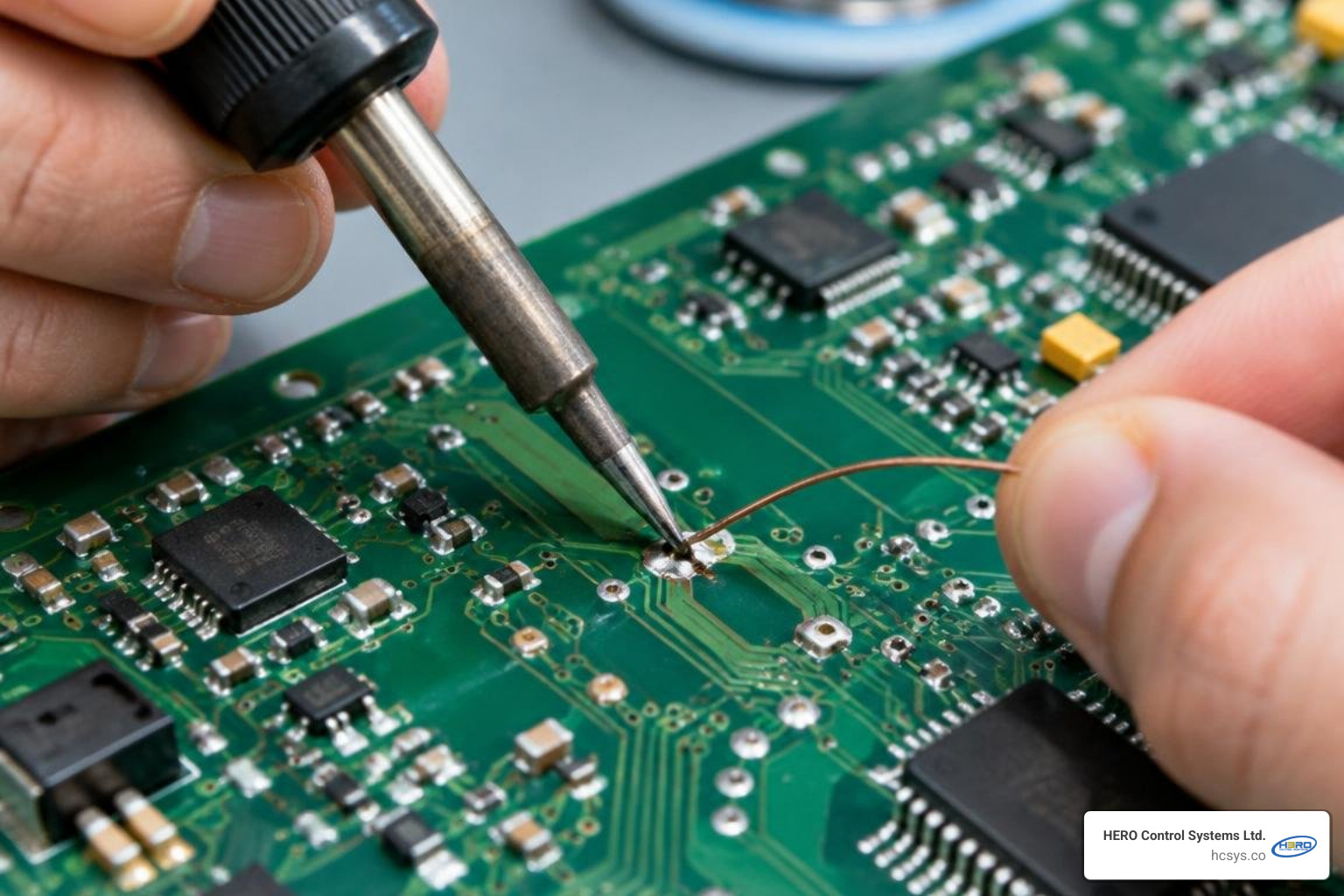
Using fine 36 AWG to 40 AWG enameled wire, solder one end directly to the component lead or exposed trace, and tack the other end to the destination pad or through-hole. Secure the jumper wire to the board with a drop of UV-curable solder mask, curing it under an ultraviolet lamp for 60 seconds. Technicians working on charging circuits often apply micro-soldering charger pad techniques to bridge high-current power pins directly to filter capacitors when standard surface pads are torn off.
That for high-frequency or high-speed digital circuits, jump wires must be kept as short as possible—under 5 mm if feasible—to avoid acting as antennas and introducing unwanted parasitic inductance and electromagnetic noise.
Method 4: Conductive Silver Epoxy as a No-Solder Alternative
In situations involving temperature-sensitive flex cables, plastic-molded connectors, or boards where applying 300°C heat would destroy nearby components, two-part conductive silver epoxy offers a cold-bonding solution.
Silver-loaded epoxy consists of micron-sized silver flakes suspended in an epoxy resin base. Once mixed in a 1:1 ratio, apply the compound using a 0.5 mm dispensing needle across the trace break. While it provides an electrical bridge, silver epoxy exhibits lower tensile strength than a soldered joint. Always encapsulate the completed bridge in non-conductive epoxy or UV resin after curing to give it mechanical support.
Step-by-Step Surface Preparation and Multilayer Considerations
A pad repair is only as dependable as the surface preparation beneath it. Without removing contamination and oxidation, both solder and epoxy will delaminate under standard operational vibration.

Solder Mask Scraping and Surface Tinning
- Decontaminate: Scrub the entire rework area with 99% isopropyl alcohol and a lint-free swab to strip flux residues, grease, and dirt.
- Expose Bare Copper: Using a fiberglass abrasive scratch pen or the rounded edge of a curved scalpel blade, scrape the solder mask from the remaining conductor trace. Hold the tool at a 45-degree angle with light pressure to avoid cutting through thin 1 oz (35 µm) or 0.5 oz (18 µm) copper traces.
- Degrease and Dry: Blow away abrasive debris with dry air and clean the newly exposed metal with IPA.
- Apply Flux and Pre-Tin: Brush mildly activated rosin flux (type ROL0 or RMA) over the bare copper. Bring a clean, tinned soldering tip to the trace for 1 to 2 seconds, depositing a smooth, shiny, flat layer of solder.
Careful manual preparation mirrors the precision needed in commercial electronics design, where surface copper purity determines final assembly yields.
Multilayer Boards vs. Single-Layer PCB Pad Repair
Repairing a single-layer PCB is straightforward because all conductive circuits sit on the external plane. In contrast, multilayer boards introduce structural challenges:
- Thermal Sinking: Multilayer boards contain thick internal power and ground planes that pull heat away rapidly. A soldering iron set to standard temperatures may experience thermal sag, leading to prolonged dwell times and further pad lifting. Use a bottom-side preheater set between 80°C and 100°C to reduce thermal shock.
- Hidden Planes and Short Circuits: If a pad pulled out an internal via barrel, drilling or scraping carelessly into the board can short the signal path directly into an internal ground plane. Inspect the hole under a microscope. If internal copper is exposed, seal the via cavity with non-conductive epoxy before running a surface jumper wire.
Testing, Troubleshooting, and Prevention Best Practices
Never return a repaired board to service without thorough mechanical and electrical validation.
Continuity Verification and Mechanical Bonding Tests
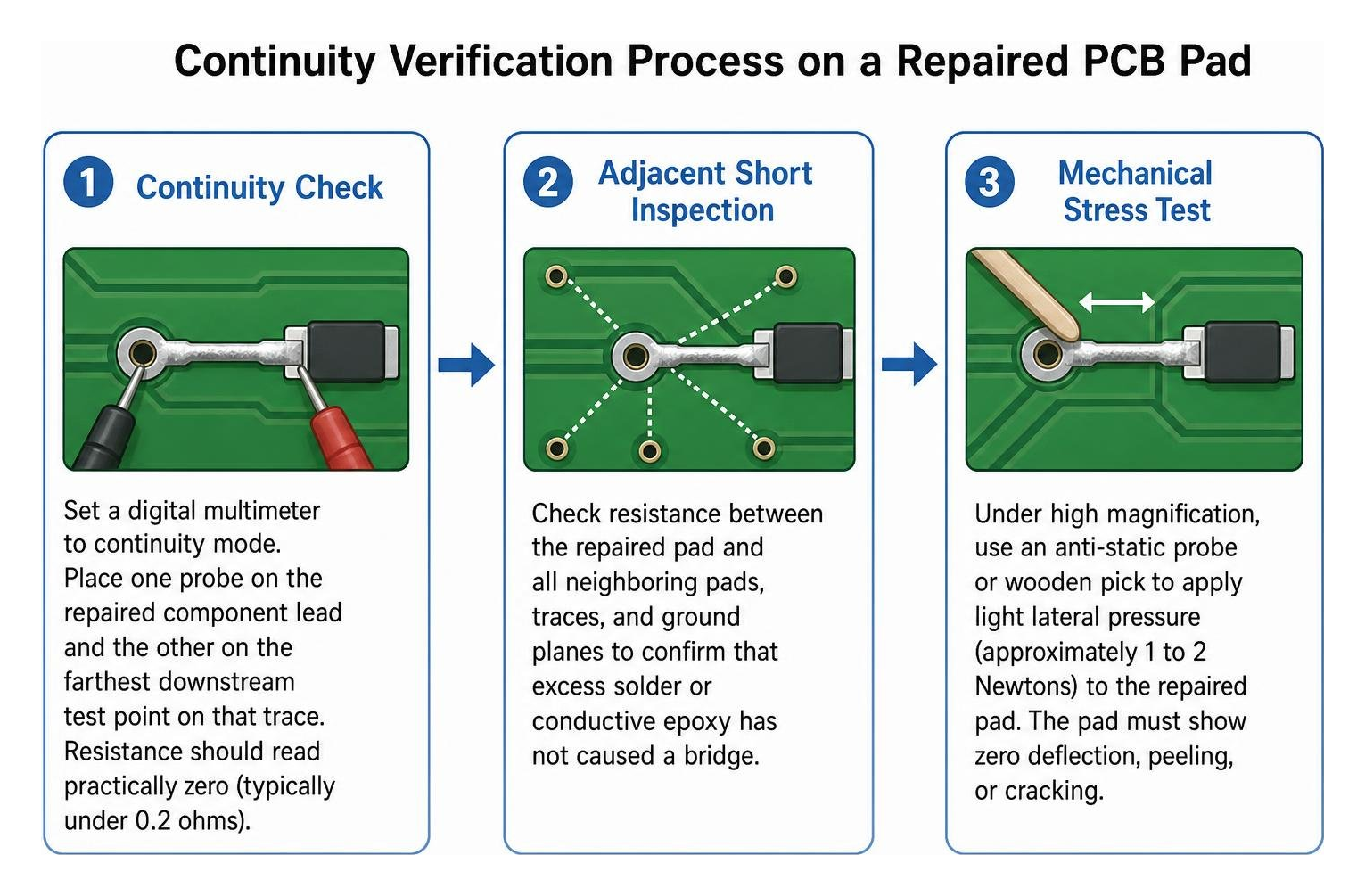
- Four-Point or Standard Continuity Check: Set a digital multimeter to continuity mode. Place one probe on the repaired component lead and the other on the farthest downstream test point on that trace. Resistance should read practically zero (typically under 0.2 ohms).
- Adjacent Short Inspection: Check resistance between the repaired pad and all neighboring pads, traces, and ground planes to confirm that excess solder or conductive epoxy has not caused a bridge.
- Mechanical Stress Test: Under high magnification, use an anti-static probe or wooden pick to apply light lateral pressure (approximately 1 to 2 Newtons) to the repaired pad. The pad must show zero deflection, peeling, or cracking.
- System Diagnostics: For complex digital boards, combine benchtop electrical checks with structured firmware and hardware troubleshooting to confirm that clock lines and communication buses operate without timing jitter or signal drops.
Preventing Pad Lift During Soldering and Rework
Pad lifting is almost always preventable. Apply these best practices during everyday rework:
- Control Iron Temperature: Maintain soldering iron temperatures strictly between 300°C and 350°C. Excessive heat destroys the cured resin bond holding copper to the laminate.
- Limit Thermal Dwell Time: Keep iron dwell time under 2 to 3 seconds per joint. If a joint does not flow smoothly within that window, remove the iron, let the site cool for 10 seconds, apply fresh flux, and try again.
- Never Pull Unmelted Components: When desoldering multi-pin ICs or connectors, verify that every pin is completely molten before lifting. Forcing a component off the board will strip pads instantly.
- Use Proper Braid Mechanics: Never drag desoldering braid across the board. Lay the braid flat, place the iron on top, allow the solder to wick upward, lift the iron and braid together vertically, and then move to the next pad.
Frequently Asked Questions About PCB Pad Repair
Can regular super glue be used to fix a PCB pad?
No. Standard super glue (cyanoacrylate) decomposes at approximately 180°C, well below the 300°C to 350°C temperature of a soldering iron tip. Heating super glue causes the bond to fail immediately, outgasses irritating fumes, and leaves an insulating, non-conductive film that ruins solder wetting. Always use a dedicated two-part, high-temperature epoxy rated for electronics repair.
How long does a conductive pen repair last on a circuit board?
A conductive pen repair typically lasts for several months if reinforced with a protective overcoat, though it is not considered a permanent fix. Conductive inks have high internal resistance compared to pure copper, and they lack mechanical strength. Under continuous thermal expansion and vibration, micro-cracks form within the ink. For high-reliability and industrial use, always replace ink traces with physical copper jumpers or foil patches.
What soldering iron temperature prevents pad delamination?
The recommended soldering iron temperature for most PCB repairs is 300°C to 350°C, with contact time strictly limited to 2–3 seconds per joint. Using a temperature below 300°C often causes the technician to hold the iron on the pad for 8 to 10 seconds, which allows heat to soak deep into the FR-4 dielectric, breaking the underlying epoxy adhesive far faster than a brief touch at 320°C.
Conclusion
Restoring a lifted or torn PCB pad is a vital micro-soldering skill that salvages expensive assemblies, eliminates long manufacturing lead times, and keeps hardware in service. By understanding pad damage, preparing copper surfaces cleanly, maintaining proper lap joint overlaps, and using high-temperature two-part epoxies, you can achieve rework that matches factory reliability.
When repair is not cost-effective or legacy circuit boards need complete replacement, our engineering team at HERO Control Systems Ltd. in Lusaka, Zambia provides comprehensive electronics manufacturing, prototyping, and PCB design services to keep your hardware running reliably. Apply these pad restoration practices to your bench, treat fine copper traces with care, and test every circuit thoroughly before power-up.